


How to Use Hill Descent Control in the Nissan Rogue Rock Creek
If you’re exploring the capabilities of the Nissan Rogue Rock Creek, you may have noticed a feature called Hill Descent Control. But what exactly does it do, and when should you use it?
Hill Descent Control is designed to help drivers maintain a controlled speed when traveling down steep descents. In the 2026 Nissan Rogue Rock Creek, this feature works alongside the SUV’s adventure-ready capabilities to make certain downhill situations easier to manage.
Here’s everything you should know about how to use Hill Descent Control.
What Is Hill Descent Control?
Hill Descent Control is a feature designed to help control the vehicle’s speed when traveling downhill.
Rather than requiring the driver to continuously manage the vehicle’s speed with the brake pedal on a steep descent, Hill Descent Control can automatically maintain speed and brake pressure to help provide a more controlled descent.
This can be especially helpful when driving on certain steep or uneven downhill surfaces where maintaining a slow, steady speed is important. Think of it as an extra tool that can help you focus on steering and navigating the road ahead while the vehicle assists with downhill speed control.
How Does Hill Descent Control Work?
When Hill Descent Control is activated, the system can automatically apply braking to help control the Rogue’s speed while traveling down a steep descent.
The goal isn’t to make the vehicle drive itself. You are still responsible for steering, watching the road and controlling the vehicle. Instead, Hill Descent Control is designed to assist with speed management so you don’t have to rely solely on repeated brake-pedal input during certain downhill situations.
How to Use Hill Descent Control in the Nissan Rogue Rock Creek
If you’re wondering how to use Hill Descent Control in your Rogue Rock Creek, start by familiarizing yourself with the Hill Descent Control button and your Rogue’s drive-mode controls.
For the current Rogue, Nissan specifies that Hill Descent Control is associated with the vehicle’s off-road-oriented driving functionality and operates at speeds below 15 mph.
Step 1: Find the Hill Descent Control Button
Before heading onto a steep descent, locate the Hill Descent Control button in your Rogue.
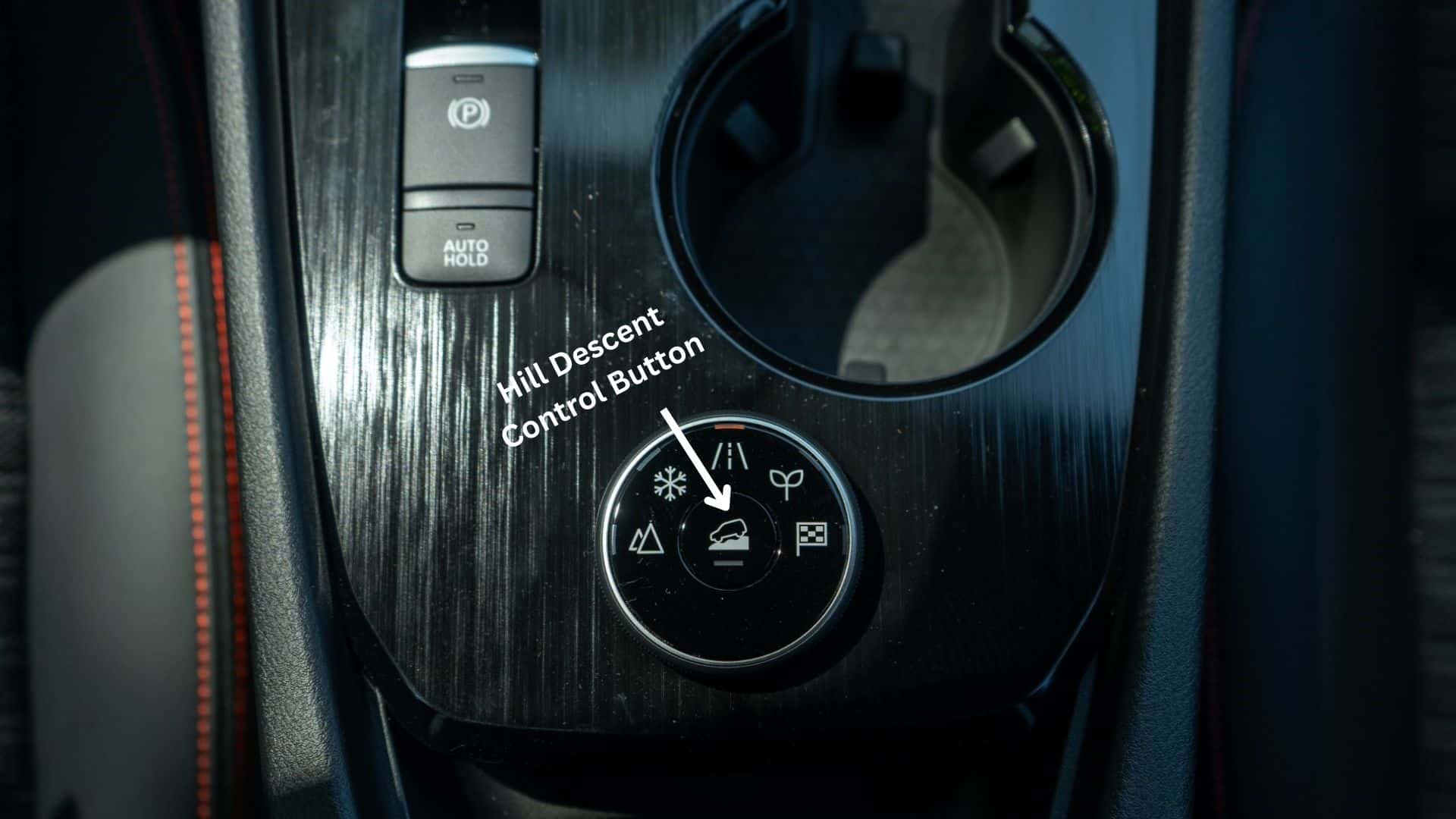
It’s a good idea to familiarize yourself with the controls while you’re parked so you aren’t searching for a button while navigating a hill.
Step 2: Select the Appropriate Drive Mode
The Rogue Rock Creek is designed with off-road-oriented driving capability in mind. When you’re preparing for a steep descent, select the appropriate drive mode for the conditions you’re encountering.
Step 3: Activate Hill Descent Control
Once you’re traveling at the appropriate low speed and the system’s operating conditions are met, activate Hill Descent Control using its dedicated control.
Step 4: Keep Your Attention on the Road
Hill Descent Control is an assistance feature, not a replacement for attentive driving.
Keep both hands available for steering, watch for obstacles and changing road conditions, and be prepared to use the brake or accelerator when necessary.
Step 5: Steer and Let the System Assist With Speed
Once Hill Descent Control is operating, concentrate on safely navigating the descent.
When Should You Use Hill Descent Control?
Hill Descent Control is most useful when you’re traveling down a steep descent at a low speed and additional speed control would be helpful.
For a Rogue Rock Creek owner, that could include situations such as:
- Steep downhill sections of an off-road trail
- Gravel or dirt descents
- Certain uneven downhill surfaces
- Low-speed downhill driving where maintaining a controlled speed is important
- Adventure-oriented driving where the terrain requires additional attention
It isn’t a feature you need to activate every time you encounter a hill. For everyday driving around Wayzata and the Twin Cities, normal braking is generally all you’ll need. Hill Descent Control is intended as an additional tool for situations where its assistance is appropriate.
Hill Descent Control vs. Hill Start Assist: What’s the Difference?
These two features are easy to confuse because they both involve hills, but they serve very different purposes.
Hill Descent Control helps when you’re going downhill. It can assist with maintaining speed and brake pressure during a steep descent.
Hill Start Assist, on the other hand, is designed to help when you’re starting from a stop on an incline.
Why Is Hill Descent Control Useful in the Rogue Rock Creek?
The Rogue Rock Creek was designed to give drivers a more adventure-oriented version of the Rogue.
Along with Hill Descent Control, the 2026 Rogue Rock Creek features standard AWD, 17-inch dark-painted aluminum-alloy wheels and all-terrain tires. It also offers an Intelligent Around View Monitor with Off-Road Mode to provide additional views around the vehicle when navigating certain environments.
That combination makes Hill Descent Control a particularly relevant feature for drivers who plan to take their Rogue beyond typical pavement. And you don’t necessarily need to be an extreme off-road driver to appreciate it. Understanding how these features work can simply give you more confidence when encountering different terrain.
Tips for Using Hill Descent Control
Before using Hill Descent Control, keep these tips in mind:
Know Your Controls Before You Need Them
Take a few minutes to familiarize yourself with the Hill Descent Control button and drive-mode controls while parked.
Don’t Assume It Makes Every Surface Safe
Hill Descent Control can assist with speed management, but road and trail conditions can change quickly. Always drive according to the conditions and your own experience level.
Check Your Owner’s Manual
Vehicle features can vary by model year and configuration. If you’re unsure about how Hill Descent Control operates in your specific Rogue, consult the owner’s manual or ask a Nissan professional.
Experience the Nissan Rogue Rock Creek in Wayzata
The Nissan Rogue Rock Creek brings a more adventure-focused personality to the Rogue lineup, with standard AWD, all-terrain tires, Hill Descent Control, and other features designed to help you feel more prepared for the road ahead.
If you’re shopping for a Nissan Rogue Rock Creek near Wayzata, visit Walser Nissan Wayzata to explore the latest Rogue models and learn more about the features that make the Rock Creek unique.
0 comment(s) so far on How to Use Hill Descent Control in the Nissan Rogue Rock Creek